

At Gradient, we are constantly investing in research and development to push what MSP Studio+ can produce. Not to add features for the sake of it, but to answer a simple question: are the graphics MSPs are generating from their brand actually good enough to stop a scroll?
For a while, the honest answer was "good, but not great." The brand fidelity was there. The consistency was there. But the visual quality of the output had room to grow.
So we went back to the fundamentals and rebuilt the graphics engine. What shipped is a meaningful step forward across everything that determines whether a post performs in a feed.
A Smarter Image Model
The most significant change is under the hood. MSP Studio+ now uses a more advanced image model for all graphic generation. Our new model handles complex scene composition, lighting, depth, and style coherence at a level that was not possible before. Graphics that previously felt slightly flat or generic now have a visual quality that holds up against content produced by professional designers. The difference is visible immediately, and it compounds across a full posting schedule.

Baked-In Text
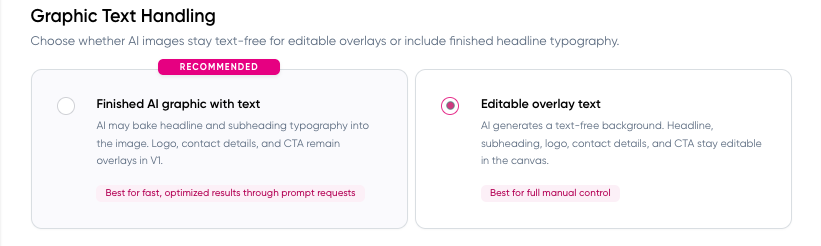
One of the most consistent limitations in previous MSP Studio+ graphics was the handling of text. Text was often treated as an overlay: positioned on top of a background image rather than integrated into the scene itself. That's still available if you fancy the manual composition and design process.
The new engine, however, bakes text directly into the graphic at generation time. Headlines, callouts, and supporting copy are treated as compositional elements, not afterthoughts. The result is graphics where the text feels designed into the image rather than placed on it. Typography sits in the scene the way it would in a professionally art-directed layout.

This matters more than it might sound. Text-over-image has been a persistent signal of template-based content to trained eyes, particularly in a LinkedIn feed where design-forward content stands out. Baked-in text removes that signal and makes the output feel intentional.
Smarter Scene Creation
The original graphics engine was strong at applying brand assets to defined layout templates. The new engine builds scenes. It generates environments, contexts, and visual narratives that fit the content topic and brand identity together, rather than slotting brand assets into pre-built structures.

This means a post about cybersecurity does not look like a post about billing with a different headline on it. The scene itself responds to the content: the visual environment, the compositional focus, the mood. Across a week of posts, this produces a feed that looks considered rather than automated.
More Visual Variety
Consistency and variety are in natural tension in content generation. Too much consistency and the feed looks repetitive. Too much variety and it stops feeling like a brand.

The new engine handles this balance better. It produces significantly more visual range within a defined brand identity, rotating scene types, compositions, and visual treatments across a posting schedule without ever drifting from the colors, typography, and style that define the MSP's brand.
For MSPs posting three or more times per week, the difference is significant. Posts feel fresh. The feed looks like a brand with something to say, not a template running on repeat.
What This Means for MSP Studio+ Users
If you are already an active MSP Studio+ user, the upgrade is live. Your existing brand settings will produce the new quality automatically. If you want to use the MSP Studio+ new text handling navigate to Settings > AI Content Settings:
If you are evaluating MSP Studio+ for the first time, this is the baseline you are starting from. The work that went into this upgrade reflects how we think about the product: not as a tool that generates acceptable content at scale, but as the marketing engine that helps MSPs show up like a brand in a channel where most MSPs still look like an afterthought.
Not using MSP Studio+ yet? Try it today!
This is a simple way to see what is possible. Test it out today and create 6 custom on-brand posts - graphics and text - completely free. That's two full weeks of polished social content (Mon/Wed/Fri) ready to publish.
GET THE MSP STUDIO+ TRIAL EXPERIENCE
FAQ
What changed in this graphics upgrade?
Four things: a more advanced image model, baked-in text that integrates typography into the scene rather than overlaying it, smarter scene creation that builds visual environments that respond to content rather than applying templates, and increased variety across a posting schedule while maintaining brand consistency.
Do I need to update my brand settings to get the new output?
No. The upgrade is in the generation engine. Your existing brand settings will produce the improved quality automatically.
Why does the image model matter?
The image model is what determines the quality, complexity, and coherence of what gets generated. A more advanced model handles scene composition, lighting, depth, and style at a higher level. The output is visibly better, and it compounds across every post that gets generated.