

How an Autotask contract is set up decides what an MSP bills, what it gives away, and whether the account makes money at all. That was the theme of our recent webinar with Chris Timm of Sondela Consulting, hosted by Gradient MSP CEO Colin Knox. This post turns the full session into a written guide you can work through before your next renewal.
Chris is a former MSP owner who sold his business in 2012. He then spent six or seven years working with Autotask, where he helped set up the technical side of the UK office, before starting Sondela Consulting around 2016 or 2017. Sondela helps MSPs get the best out of their PSA tools, with a focus on Autotask, and Chris is the author of PSA Profitability. Colin has spent 22 years in managed services. He built, scaled, and exited his own MSP, and he has worked alongside roughly 20,000 MSPs over the years.
 Prefer to watch? The full recording is available on demand: https://www.meetgradient.com/resources/on-demand-5-things-you-need-to-know-about-contracts-if-your-msp-uses-autotask
Key Takeaways: 7 Things to Act on Before Your Next Renewal
- Pick the contract type that matches how you actually sell the service.
- Set contracts up one year at a time, and renew each year.
- Renew with the renewal wizard instead of changing the end date.
- Keep recurring services, unit counts, costs, and burden rates in step with reality.
- Exclude out-of-scope work, and give it somewhere to be billed.
- Check expiring and open-ended contracts every month.
- Build a dashboard so you can see what is happening across your contracts.
Which Autotask Contract Type Should an MSP Use?
Most MSPs will use a recurring service contract, and possibly a block hours contract alongside it. The contract type matters because it underpins everything else in the PSA, and it can even dictate what you are able to add as a billable service.
The Autotask contract types in plain terms
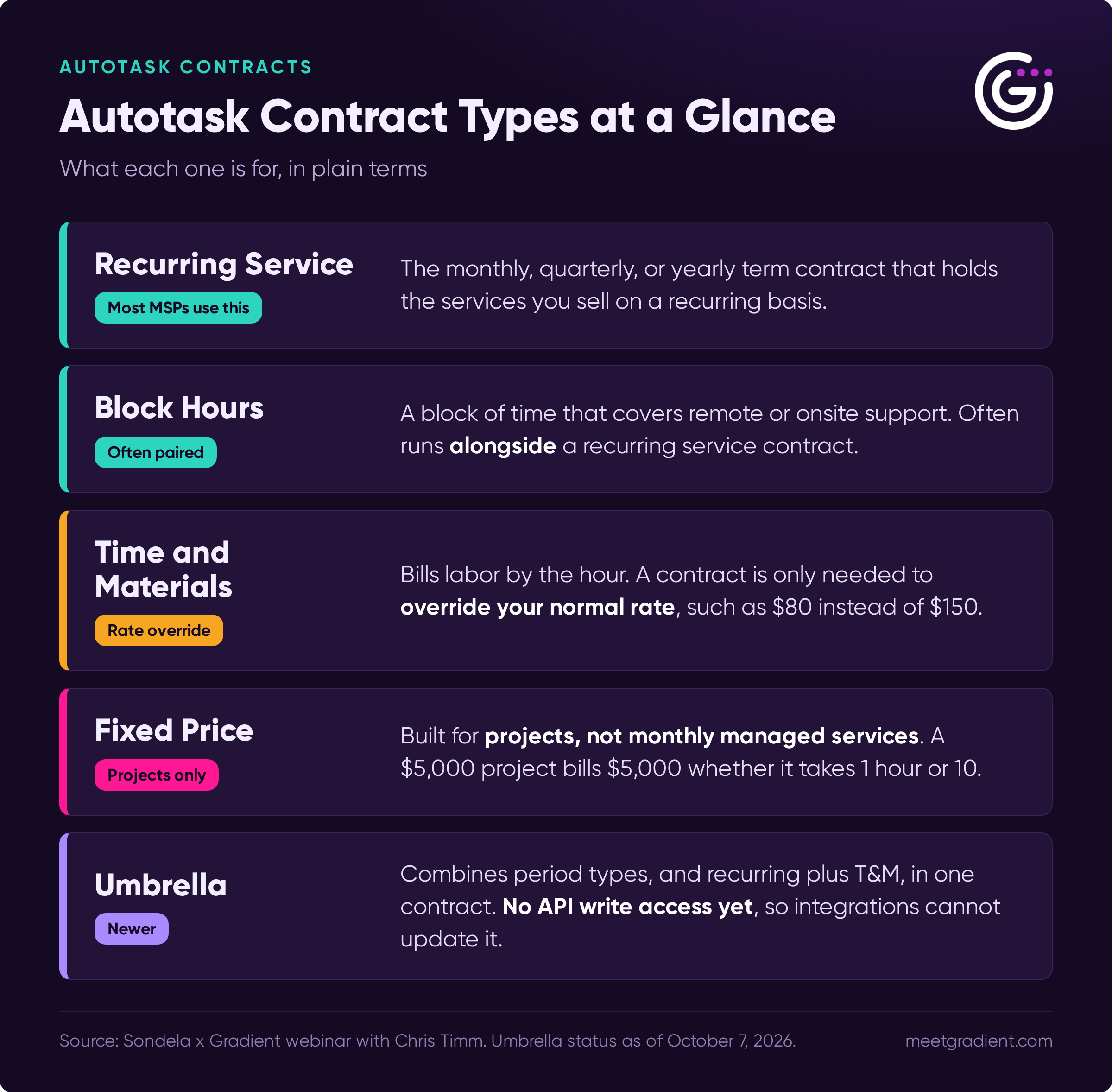
- Recurring service: the monthly, quarterly, or yearly term contract that holds the services you sell on a recurring basis.
- Block hours: a block of time that covers remote or onsite support. It often runs side by side with a recurring service contract and is linked to it.
- Time and materials (T&M): Chris pointed out that, strictly speaking, you do not need a contract to bill T&M labor. The contract's job is to override your normal rate. If you usually bill $150 an hour but charge one customer $80, the contract is what applies the $80.
- Fixed price: this one confuses people. A fixed price contract is designed for projects, not monthly managed services. If you charge $5,000 for a project, you bill $5,000 whether the work takes one hour or ten. MSPs who mistake it for a managed services contract end up wondering why they cannot add their Microsoft 365 licenses to it.
- Umbrella: the newest type, covered below.
Colin added that he has seen even large MSPs choose a T&M contract and then try to shape it into a recurring services contract. It does not work the same way.
What about Autotask umbrella contracts?
Autotask introduced umbrella contracts about a year before the webinar. They allow you to combine multiple period types, such as monthly and yearly, in one contract. They also let you run recurring and T&M arrangements together in the same contract, and set date-based rates. For example, a customer could pay $80 an hour for the first year and return to $150 after that.
There are limits as of the webinar date (October 7, 2026). Umbrella contracts currently cover T&M and recurring services, not fixed price or block hours. The bigger caveat is that there are no API routes yet to write to umbrella contracts. That means integrations from your distributors, your other vendors, and Gradient cannot update them. Any client on an umbrella contract needs manual updates and manual reconciliation.
Because of that, Chris does not currently recommend setting them up. He still points people to the legacy contract types, especially if they use integrations. Once API access arrives, Colin said Gradient and Chris may host a webinar dedicated to umbrella contracts.
Billing tip for umbrella contracts: post any increases, decreases, or changes effective the day before your next billing cycle starts. If you want added licenses to bill on November 1, post the change for October 31. If you post it for November 1, it will not bill until December 1.
Why Set Autotask Contracts Up One Year at a Time?
Setting contracts up one year at a time gives you a yearly checkpoint with each customer. Chris was clear that nothing is wrong with signing customers to three or four year terms, which many MSPs do. His point is about how you build the contract in the PSA.
A yearly term lets you ask the questions that matter: Is this contract profitable? Should we add or remove anything? Is something not working? Waiting three years to ask means a long time in an industry that moves fast.
There is also a practical limit in Autotask. Once a service is attached to a contract, you cannot fully remove it mid-term. You can zero it out for the following month, but the line item stays. At renewal, you can reshape the contract. If you change your antivirus product, for example, you can swap it in cleanly without old items hanging around.
A few related tips from the session:
- Use the three-month mark as your trigger. When a contract is three months from expiring, use it as the prompt to call the customer. If everything is fine, hit the renew button for another year.
- Avoid vendor names in service names. Chris recommends "Managed Backup" rather than the name of a specific backup product, with Microsoft 365 as the main exception. If you change providers, the service can stay in place.
- Watch for blank or zeroed-out lines on invoices. Colin noted that a client's finance team may not understand why a line is zero, and the back-and-forth can delay payment.
- Clean out the catalog. Colin has seen product and service catalogs that hold a whole cemetery of old items from things MSPs tried in the past.
How Do You Renew an Autotask Contract Properly?
Use the renewal wizard instead of changing the end date. Colin admitted he used to push an expiring agreement out to an arbitrary future date just so he could post the invoice, and the session explained why that is a mistake.
The renewal wizard works like a clean slate. You can change the start and end dates, and add or remove services as you go through it. Autotask also sets the new contract's start date to the day after the previous contract ends. Extending the end date forever skips all of that.
When should you renew?
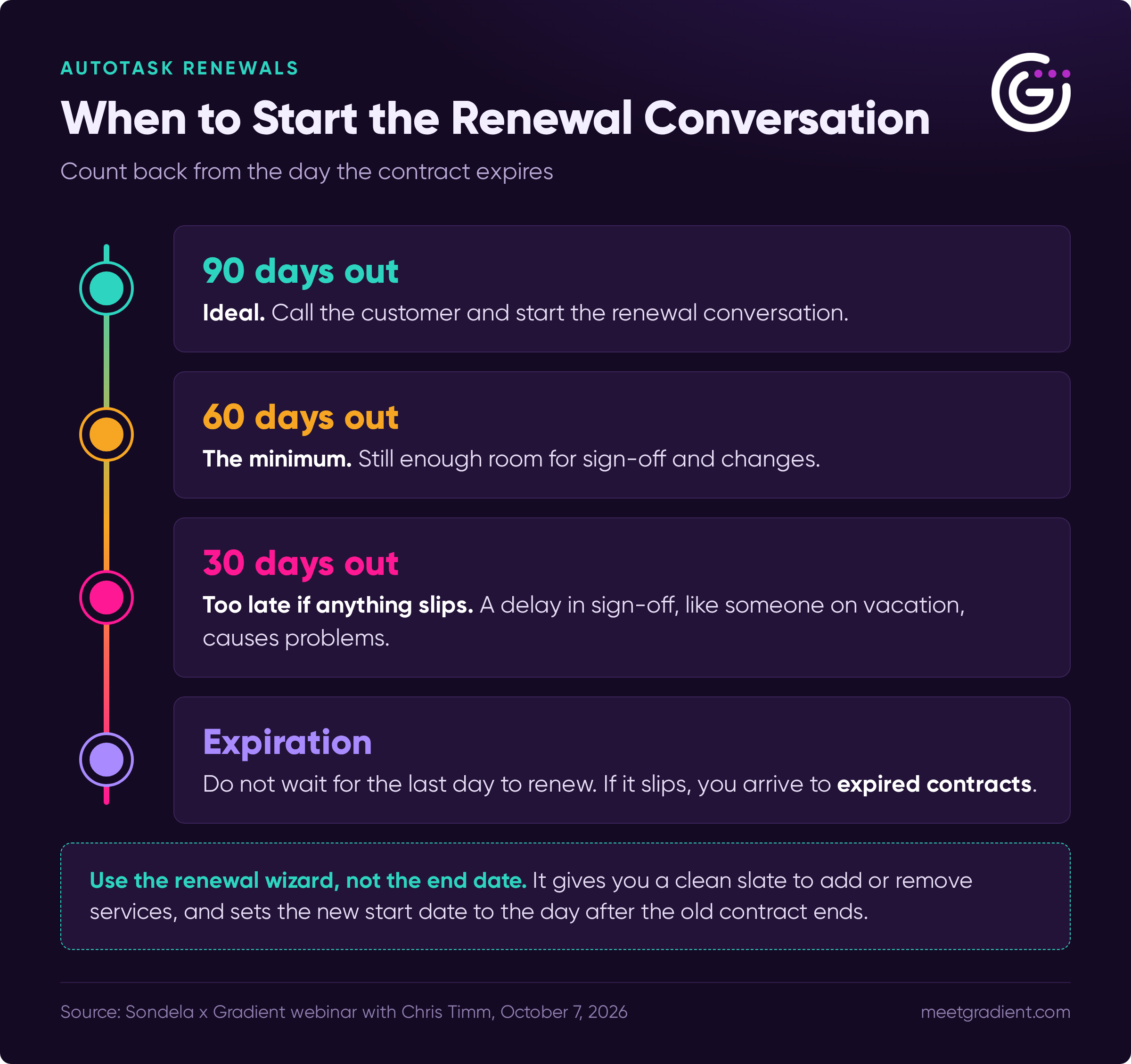
The wizard can be run at any time, so there is no reason to wait for the last day. Chris recommends against it: if the day goes sideways, you arrive the next morning to expired contracts. Many MSPs act when they get a warning 30, 60, or 90 days out.
For the customer conversation, Colin and Chris agreed that 90 days before expiration is ideal, and 60 days is the minimum. Do not wait until 30 days, because any delay in sign-off, such as someone being on vacation, causes problems.
Ways to stay ahead of renewals:
- Use Autotask dashboards and workflow rules to remind you or create tickets.
- Chris built an MCP server for Autotask that lets him ask Claude about expiring contracts, send himself an alert by email or in Teams, and even renew them.
- The Gradient dashboard includes a contract insights view of contracts expiring in the next 30, 60, and 90 days.
- If your signed agreement has a built-in annual price increase, such as a set percentage each year, the renewal reminder is also your prompt to remind the client about it.
Moving to standardized contracts
A viewer asked how to move from partially implemented contracts to a fully managed setup. Chris recommended choosing a cutover date and standardizing every customer on contracts at the same time, while taking each customer's signed contract dates into account. One approach is to let existing contracts expire and create a new contract for the next term.
If you cannot wait, you can change the end date of the old contract, but only to end it. Chris sets the end date, marks the contract inactive, and starts a whole new contract. You can change a contract's end date, but not its start date once it has started.
How Do You Keep Recurring Services and Unit Counts in Step With Reality?
Keep both sides of the contract current: your price and your cost. Profitability on a contract is revenue minus all costs, and those costs include the cost of delivering the service, not just the products you resell.
Chris sees the same problem constantly. An MSP sets up Microsoft 365 with a cost and a selling price, never changes either, and then Microsoft raises its price. Even worse, some line items have no cost at all. A Microsoft 365 line with a zero cost makes the contract look 100% profitable, which it is not.
Enter your burden rates
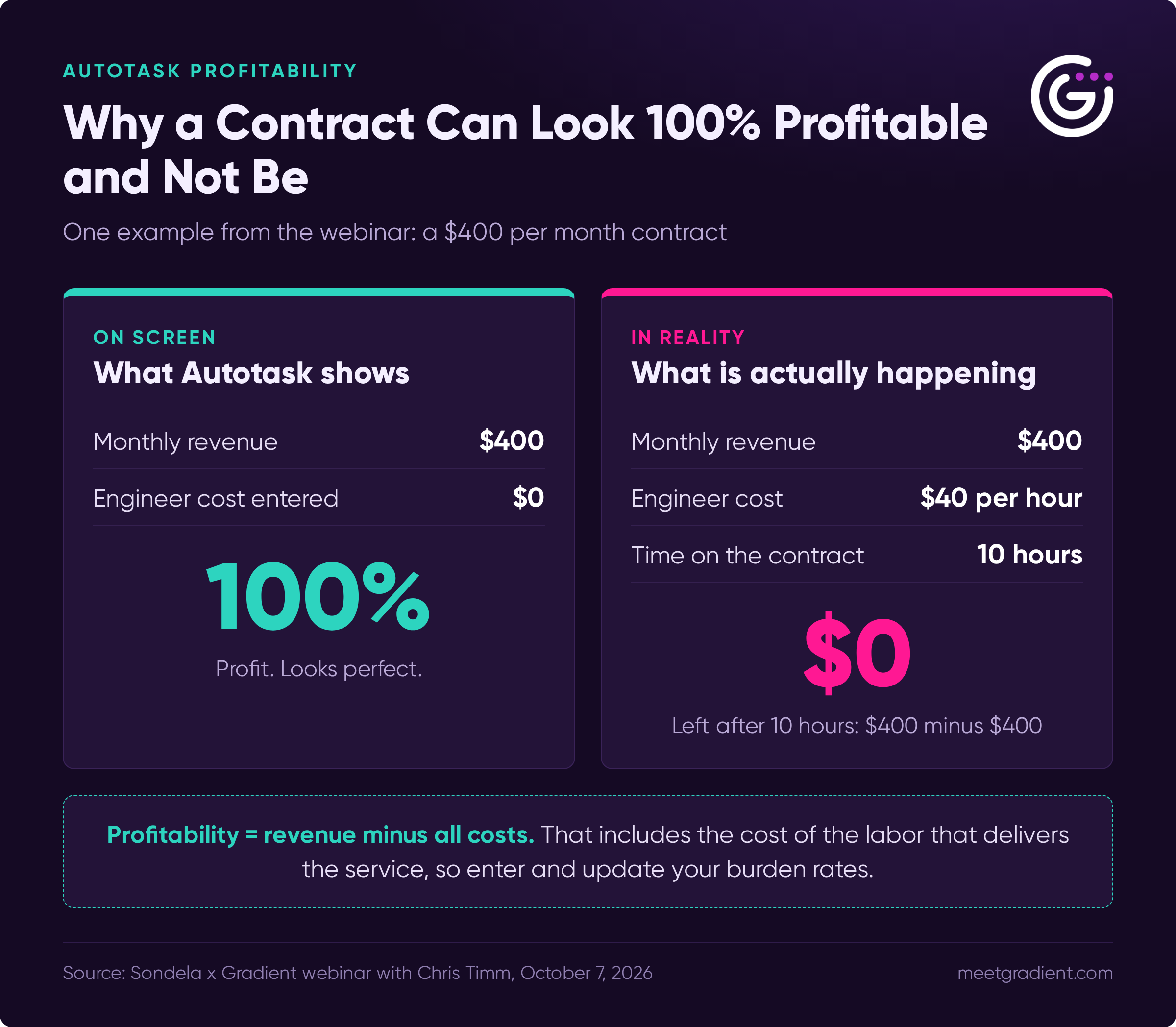
Burden rates are the hourly cost of your technicians. In Autotask, the only place you enter them is on the resource (user) screen. When time is logged against a contract, that is how the cost of labor reaches the contract's profitability numbers.
Chris gave an example. A customer pays $400 a month and your engineer costs $40 an hour. Without the $40 entered, the contract shows as 100% profitable. In reality, ten hours of engineer time wipes out the margin. Colin added that you can mark up every product 100% or more and still lose money if technicians spend heavy time supporting that client.
Keep these current. When engineers get raises or move from tier one to tier two, their burden rates change too.
Solo owners and outsourced help desks
A viewer asked how a solo owner who also uses an outsourced help desk should handle costs. Chris's answer: you are still a cost to your business, so enter your own burden rate. Outsourced help desk providers typically log into Autotask as an agent, so you can assign a cost to that agent. You can also build the cost into your services. What matters is that every cost lives somewhere, because profitability is revenue minus costs. Colin agreed that a one-person shop and a 50-person shop should both include subcontractor costs.
Vendor price changes add up quickly
Colin pointed to Microsoft's most recent price increase, which applied to subscriptions renewing after July 1. A change of $0.75 per seat sounds small. Across 500 seats for a year, it adds up to $4,500 in profit gifted to your customers. When a vendor notifies you of a change with a date, you can update the cost in your PSA ahead of time, see the margin impact, and decide on your resale price.
Standardize product IDs and contract names
Colin recommended a consistent format for product IDs (SKUs) in your PSA, because integrations and searches both depend on it. A format could include a vendor acronym, a product abbreviation, and the term, such as annual or monthly commitment. You can add the year if a product is only offered in 2026. Chris applies the same logic to contract names. Instead of "Managed Services Contract," use something like the company name plus the plan and year. Neither speaker cared which convention you choose, as long as it is consistent across your business.
Chris also noted that changing many burden rates one at a time is tedious, and that built-in reports or an MCP server connected to an AI assistant can make bulk changes for you.
One more point from Colin: any AI assistant, reporting tool, or business intelligence system connected to your PSA is only as good as the data in it. Garbage in, garbage out.
How Do Autotask Contract Exclusions Work?
By default, everything is included in an Autotask contract. Exclusions are how you tell the PSA what is not covered. If onsite support is excluded, a ticket using that work type will not draw from the contract, so the work is billed separately as T&M or taken from a block contract.
You can get granular. Chris explained that you can exclude work types, roles, and even issue and sub-issue types. For example, you could cover remote support but exclude it for one specific issue type.
Excluded work still needs somewhere to go. Add it to a block contract, or let it fall through to T&M so it gets billed, including at an override rate if the contract has one. Colin noted that nearly every client has out-of-scope situations, and that few MSPs still run all-you-can-eat contracts because they are so hard to keep profitable.
How Do You Find the Autotask Contracts Nobody Is Watching?
Turn on your contract dashboards, and review expiring and open-ended contracts every month. Expired contracts that are still being worked, and contracts extended without review, are where money quietly disappears.
During the session, Colin asked who was reconciling all of their services, across all vendors and all client contracts, every single month. Few responded. He said most MSPs he talks to reconcile quarterly, twice a year, or annually, and that fewer than 5% of the people attending live were doing it monthly. Without a regular review, you might not even notice that a contract has expired when you post all your invoices.
Chris pointed out that Autotask includes dashboards out of the box for this. One dashboard has roughly 20 widgets covering contracts expiring by customer, contract type, and service type, with 30, 60, and 90 day views. You can also set a workflow rule to create a ticket or an opportunity for your sales team, which ties directly into the 90-day renewal conversation.
Autotask Contract Checklist: What to Do Before Your Next Renewal
- Match the contract type to how you sell. Use a recurring service contract for managed services, not a fixed price or T&M contract.
- Set terms one year at a time. Create a yearly checkpoint with every customer.
- Renew with the wizard. Do not push the end date out to post an invoice.
- Start renewal conversations 90 days out. Treat 60 days as the minimum.
- Update costs and prices. Make sure no line item has a zero cost, and update when vendors change pricing.
- Enter and maintain burden rates. Add your own, your team's, and any outsourced agent's.
- Exclude out-of-scope work. Give excluded work a contract, or let it bill as T&M.
- Review expiring and open-ended contracts monthly. Use a dashboard so nothing slips by.
Where Gradient Reconcile Fits
Your contracts define what you should be billing. Gradient Reconcile is how MSPs make sure they actually do it every month, without overbilling clients, underbilling them, leaving money on the table, or damaging trust. As Colin said during the webinar, that is what Gradient was built for. If your Autotask contracts need cleanup first, Chris Timm and Sondela Consulting are Gradient's preferred partner for Autotask configuration and best practice implementations.
- Learn more about Reconcile: https://www.meetgradient.com/reconcile
- Sondela Consulting: https://sondelaconsulting.com
- Watch the full webinar on demand: https://www.meetgradient.com/resources/on-demand-5-things-you-need-to-know-about-contracts-if-your-msp-uses-autotask
Frequently Asked Questions About Autotask Contracts
What is the best Autotask contract type for managed services? A recurring service contract is the right fit for most MSPs. It holds the services you sell monthly, quarterly, or yearly. Many MSPs pair it with a block hours contract for remote or onsite support time.
Do I need an Autotask contract to bill time and materials? Strictly speaking, no. A contract is only needed to override your normal rate. If you bill $150 an hour by default but charge one customer $80, the contract applies the $80.
What is an Autotask fixed price contract used for? Projects. A fixed price contract bills a set amount no matter how many hours go into the work. It is not designed for monthly managed services, which is why services such as Microsoft 365 licenses cannot be added to it the way they can to a recurring service contract.
Should MSPs use Autotask umbrella contracts? Chris Timm does not recommend them yet, as of the webinar date (October 7, 2026). There are no API routes to write to umbrella contracts, so integrations cannot update them, and updates must be done manually. He still recommends the legacy contract types, especially if you use integrations.
How do I renew a contract in Autotask? Use the renewal wizard. It lets you change dates, add or remove services, and start from a clean slate. It also sets the new contract's start date to the day after the previous contract ends. Do not just push the end date out.
How early should an MSP start the renewal conversation? Ninety days before expiration is ideal, and 60 days is the minimum. Waiting until 30 days leaves little room if sign-off is delayed.
Why does my Autotask contract show 100% profitability? Usually because cost fields are empty. If a product line has a zero cost, or technician burden rates have not been entered, the contract appears fully profitable even when it is not.
What are Autotask contract exclusions? Exclusions are the work types, roles, and issue types that a contract does not cover. Excluded work is billed separately, either through a block contract or as time and materials.
How often should MSPs review expiring contracts? Every month. Use a dashboard to see contracts expiring in the next 30, 60, and 90 days, and review contracts that have been extended without any changes.