
Your ConnectWise agreements do more than generate invoices. They decide what is on contract and off contract, what you report as profit, what your clients see every month, and what a buyer finds when they look under the hood of your MSP.
In a recent webinar, Colin Knox, co-founder and CEO of Gradient MSP, sat down with Rick Harbor, founder and CEO of Decision Digital, an Atlanta MSP approaching its 30th year. Between them, they have decades of MSP operations and more billing reconciliation experience than most people would ever want. Here is what they shared about turning agreements into an accurate, reconciled billing engine that pays you for everything you deliver.
1. Why is your invoice the most important touchpoint with your clients?
Your invoice is the one thing every client reads every single month. Emails get ignored, calls go to voicemail, and ticket follow-ups go unanswered, but the bill always gets opened. That makes your agreement configuration a client experience decision, not just an accounting one.
Rick sees MSPs fall into two camps that both miss the mark:
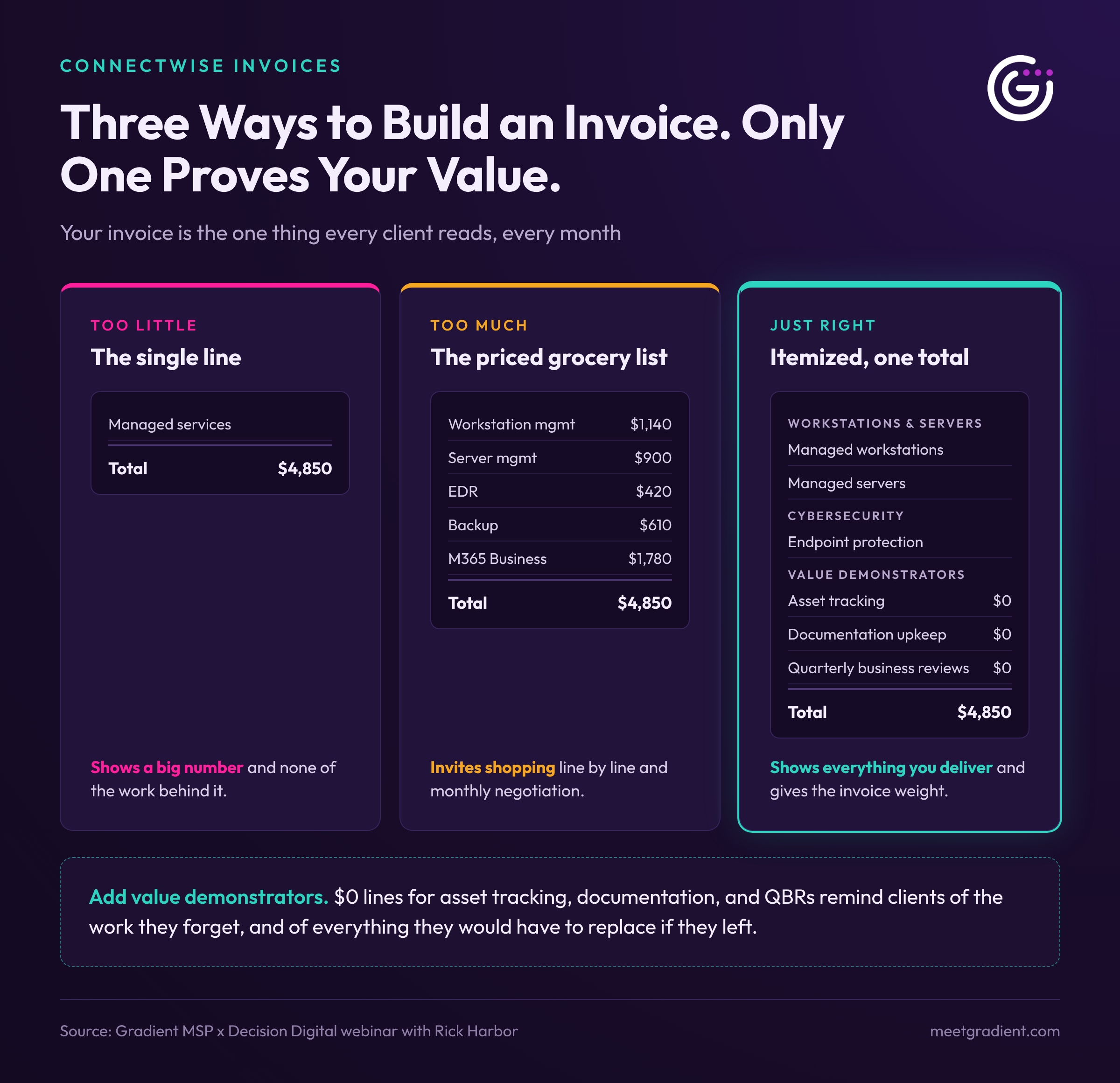
- The single line: "Here is what it costs, just pay it." The client sees a big number and none of the work behind it.
- The priced grocery list: every service with a price next to it. This invites clients to shop you line by line against competitors and negotiate every month.
The MSPs that do best sit in the middle. They list every service in plain, non-technical language, grouped logically (workstations, servers, cybersecurity, Microsoft licensing), with one total at the bottom. The invoice should feel sophisticated, not complicated.
Add value demonstrators
Rick recommends adding $0 line items for the work clients forget you do: asset tracking, documentation upkeep, and QBRs. Clients have short memories, just like the rest of us. Most people cannot remember what they had for dinner last Friday, and your client will not remember the strategy review you held in March unless something reminds them.
These lines give the invoice weight. As Colin put it, the goal is not only giving clients reasons to stay; it is giving them reasons not to leave. Every service listed is something they would have to replace if they walked away.
This matters more than ever. Many clients now go deep into a switching decision before they ever call you. By the time you hear about it, someone is already offering 20% less, and you are invited into the conversation last.
2. Why is the cost field not optional in ConnectWise?
If your agreement additions do not carry accurate costs, your profitability reporting is fiction. The ConnectWise financial dashboard breaks down each agreement by addition cost and the time logged against it, yet most partners have never opened it. Without real costs, every agreement looks wildly profitable, and that false confidence is dangerous.
The problem goes beyond $0 costs. Often costs were entered once, years ago, and never touched again while vendors kept raising prices.
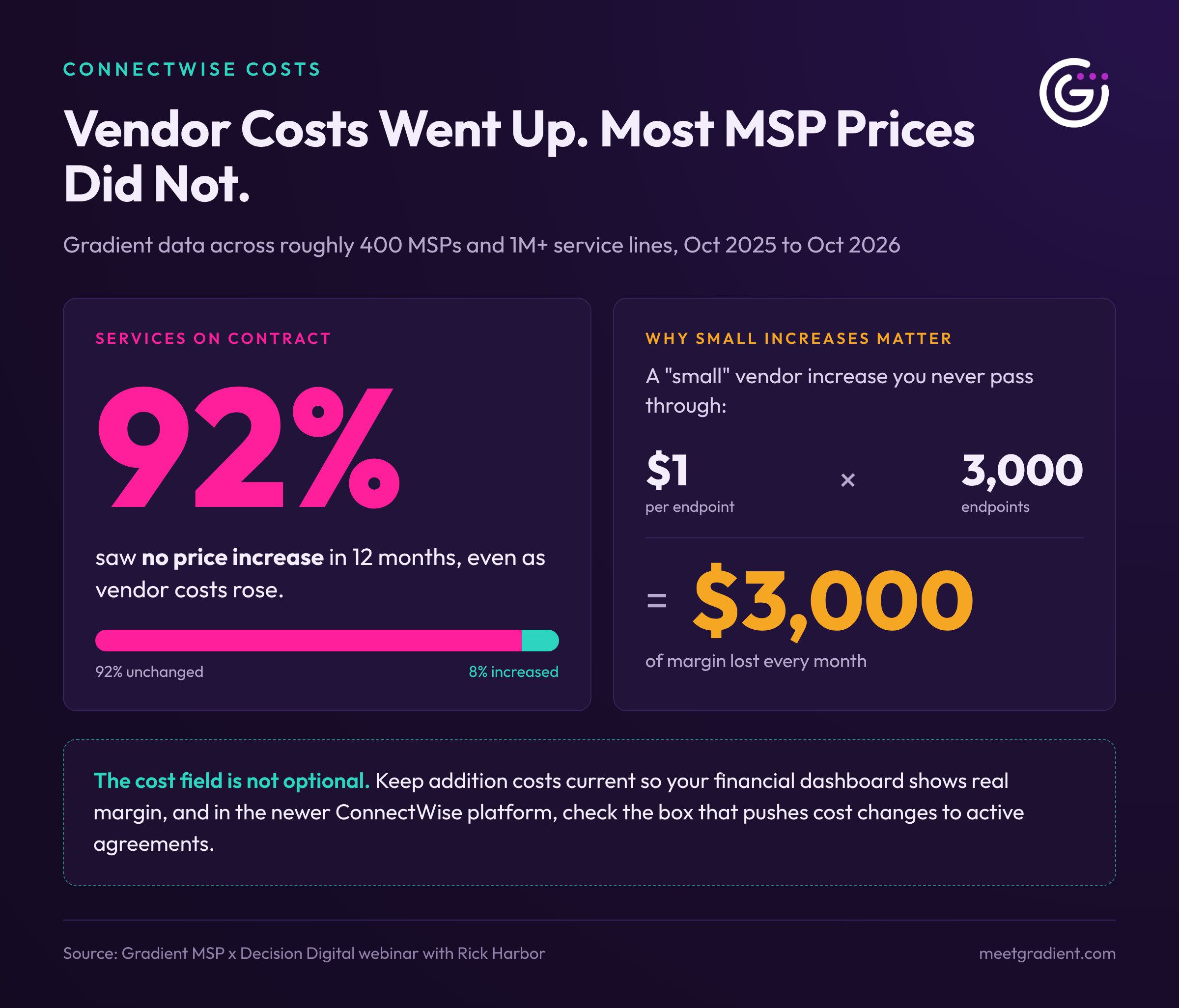
Gradient's data shows how widespread this is. Across roughly 400 MSPs and more than a million service lines, 92% of services sold on contract did not see a price increase between October 2025 and October 2026, even as vendor costs rose. The one consistent exception was Microsoft, where cost increases are almost universally passed through.
Small increases add up fast. A $1 per month cost increase across 3,000 endpoints is $3,000 every month leaving your margin.
Keep costs current and correctly mapped
- Map general ledger codes per product. Revenue and margin from Microsoft 365 should not land in the same bucket as managed backup. ConnectWise honors GL codes at the addition level, so use them.
- Know the catalog limitation. In classic ConnectWise, once an addition is added to an agreement it becomes an island. Updating the product catalog does not update existing additions, a safeguard from an era when MSPs managed two or three platforms, not today's average of 24.
- Use the new platform checkboxes. In the newer ConnectWise platform (formerly Asio), each catalog product has a checkbox to push cost increases to every active agreement, and a separate one for selling price. Rick recommends turning on cost and leaving selling price off, so price changes stay tied to your contracts and client relationships.
- Get credit for what you absorb. If you hold a client's price through a vendor increase until renewal, tell them. Showing what you protected makes the eventual price adjustment easier to accept.
3. How do you keep agreements matching reality in a consumption world?
Accurate agreements require a human in the loop. Consumption shifts every month, and while one seat up or down seems minor, those dollars compound across every client and product.
Billing mistakes run in both directions:
- Overbilling erodes trust. A client who turned off 30 endpoints three months ago and is still paying $125 each will notice, and you will be writing a credit.
- Underbilling hides in plain sight. Rick's red flag: an agreement showing a $3,000 effective hourly rate. That usually means you are not delivering everything you committed to, not that you are brilliant at pricing.
Clients audit their invoices the same way you audit your vendor bills. If a vendor overcharged you $50, you would screenshot the portal and call your rep. Your clients do the same.
Why vendor integrations alone are not enough
ConnectWise supports hundreds of vendor integrations, and many are used to sync agreement quantities. The problem is that integrations push numbers without the decision logic your business runs on. Colin shared common examples:
- A technician deploys 13 licenses to the wrong tenant. The vendor says 33, the PSA says 33, everything "matches," and the client is billed for seats that belong to someone else.
- Trial or pilot seats get billed as if they were sold.
- "Less included" quantities, bundles, and client-specific packages are ignored.
That is why billing integrations have lower adoption than ticketing integrations. Many MSPs have been burned.
Revenue integrity: three realities that must align
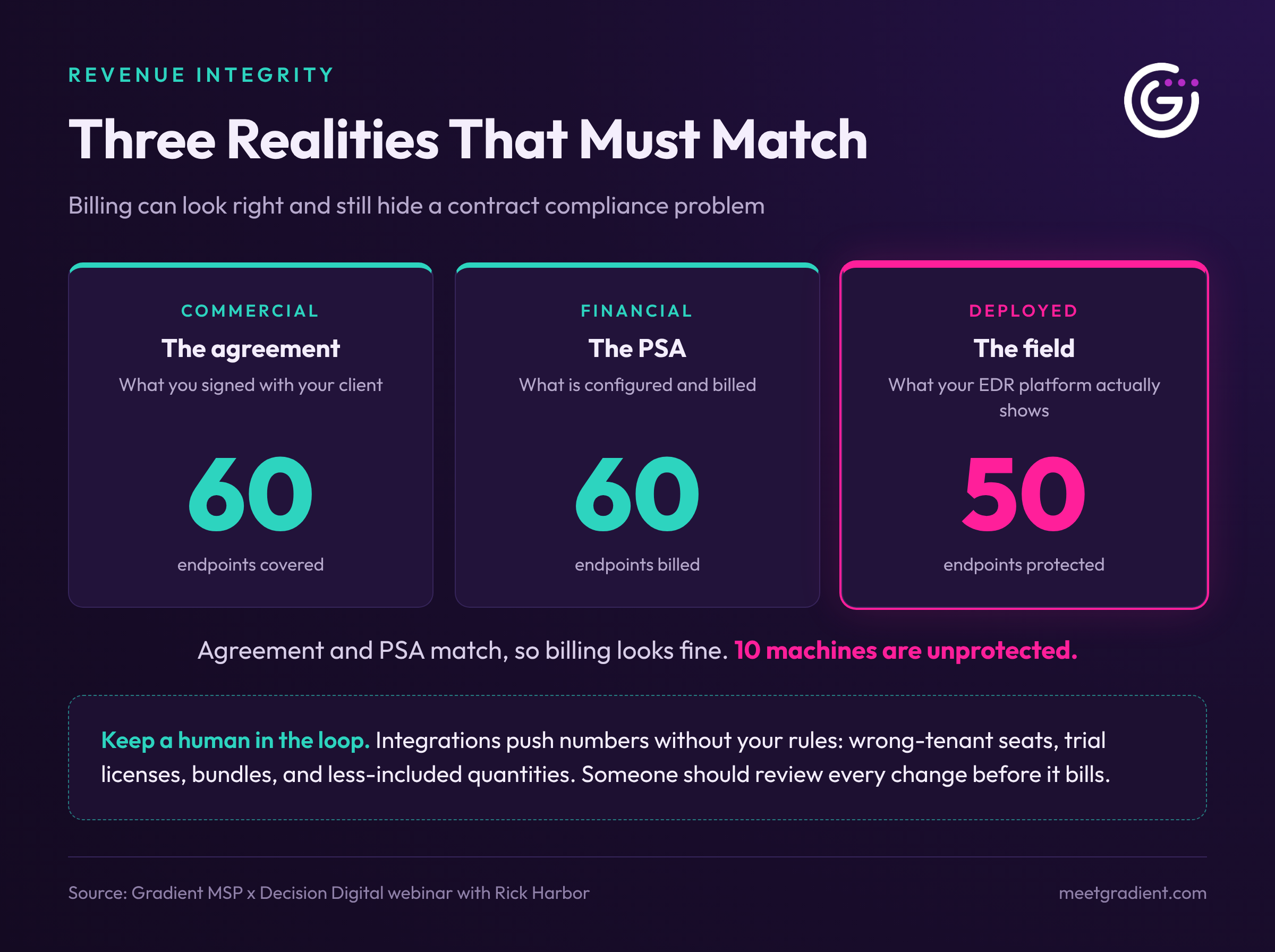
Colin frames accurate billing as revenue integrity, where three things match:
- Commercial reality: the agreement you signed with your client.
- Financial reality: what is configured and billed in your PSA.
- Deployed reality: what is actually running in the field.
Rick's example: your RMM shows 60 endpoints and your agreement bills 60, but your EDR platform shows only 50. Billing looks fine, yet 10 machines may be unprotected. If one of them is compromised, or another MSP runs an assessment, you have a contract compliance problem, not just a billing one.
Gradient has completed roughly 13,000 hours of reconciliation work for MSPs over the last year and a half. Through MBR, its managed billing reconciliation service, the team has repeatedly found gaps like this, where partners were billing for security services (MFA, EDR, MDR) that were not fully deployed, and helped them fix it before it became an incident.
4. Why are miscellaneous and free-text products hurting your MSP?
Every "miscellaneous" or free-text line in your agreements is data you can never use. You cannot track its cost reliably, report how much of it you have sold, or see how often it is serviced.
Rick's rule is simple: if a product does not exist in your catalog, create it, give it a cost, and attach it as a proper addition. Then you can measure it, report on it, and forecast with it. This matters even more as MSPs adopt AI agents and reporting tools, because AI is only as good as the data it works from.
It also affects your exit value
M&A remains one of the hottest topics in the MSP space. If you plan to sell or merge in the next five years, know that buyers look closely at your agreements during due diligence. When they find:
- Miscellaneous lines everywhere, they cannot map your services to theirs or spot volume discount and cross-sell opportunities. Unclear lines can look suspicious.
- Stale costs and prices that were never passed through, they see quick wins they will capture after the deal, value that should have been yours.
- Unreconciled quantities, they find recurring revenue you left uncollected.
At best, this slows the deal. At worst, money comes off the table at the eleventh hour. Make reconciliation a monthly discipline, not an end-of-quarter scramble.
5. Which ConnectWise agreement settings do most MSPs get wrong?
A handful of settings make the biggest difference to how clean your billing is and how easy it is to reconcile.
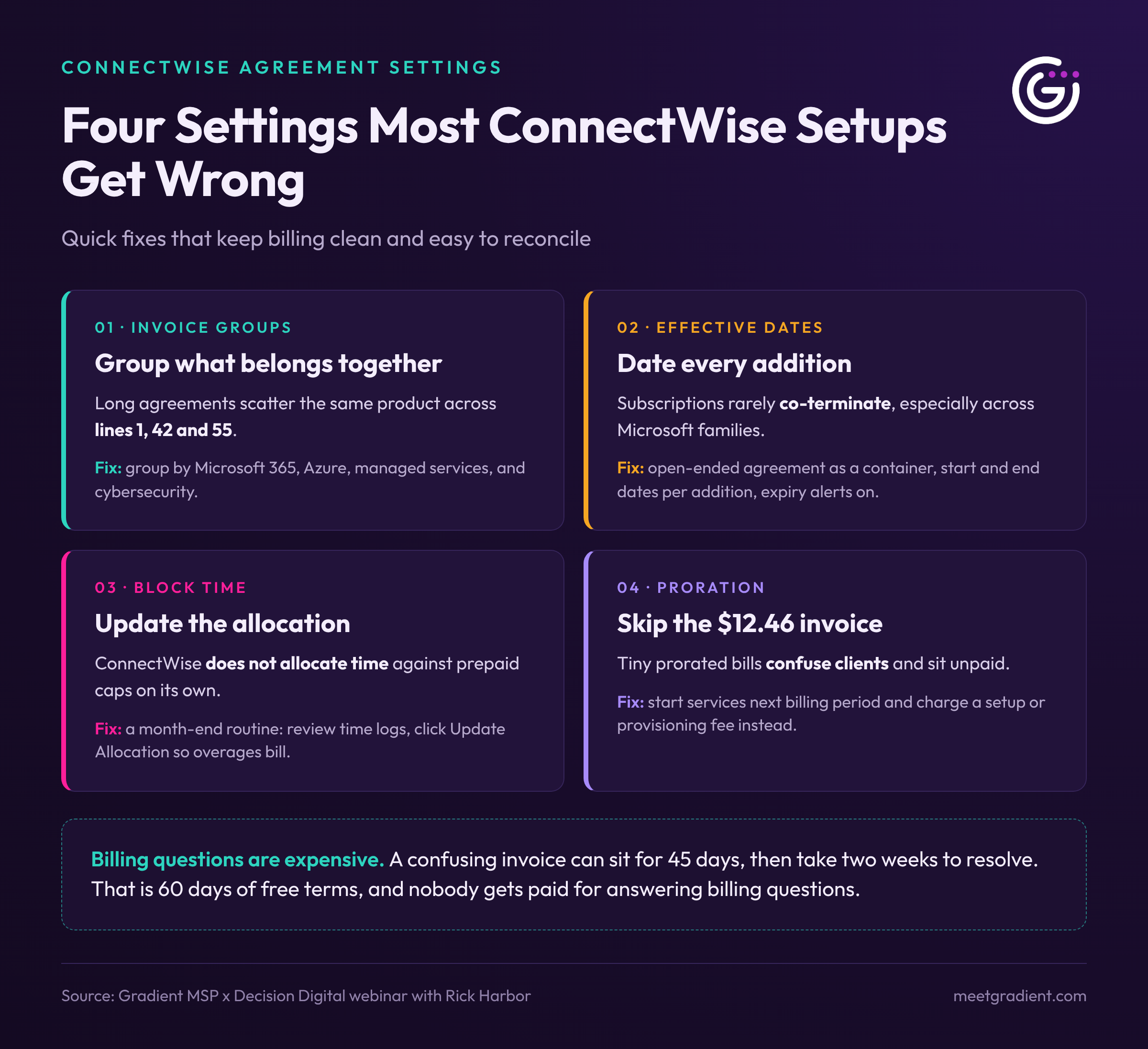
Invoice groups
Invoice groups are the most underused agreement feature in ConnectWise, mostly because they are easy to miss in the interface. Long agreements with 50 to 70 lines often scatter the same product across line 1, line 42, and line 55, which frustrates your accounting team and your client's.
Invoice groups let you organize the printed invoice by category: Microsoft 365, Azure, managed services, cybersecurity. Clients can follow the bill easily and pay faster. If quantities disappear inside a group, check the invoice group setup; it includes options that control which details appear on the items within each group.
Effective dates
Many MSPs now run an open-ended agreement as a container and give each addition its own start and end date. This reflects how subscriptions really work, since services (especially across Microsoft product families) rarely co-terminate. Set those dates carefully and turn on the ConnectWise workflow that alerts you when addition dates approach expiration, so renewals never slip by.
Prepaid caps and block time
If you sell block time, build a month-end routine. ConnectWise does not allocate time against these agreements on its own. Open each one, review the time logs, and click Update Allocation so overages are billed as they should be.
Proration
Tiny prorated invoices, like a $12.46 bill for a mid-month license, confuse clients and often get parked unpaid. Rick's alternative: start new services on the first day of the next billing period, and charge a setup or provisioning fee that covers (or exceeds) the prorated amount. You capture the revenue, keep billing dates aligned, and avoid the odd invoices that trigger questions.
Why does this matter? Billing questions are expensive. A confusing invoice can sit for 45 days until a past-due reminder prompts a call, followed by two weeks of back and forth. You have just given that client 60 days of free terms, and nobody gets paid for answering billing questions.
The bottom line: agreements that report honestly and bill correctly
Colin summed up the session in one formula: itemized additions, real costs, accurate quantities, and clean catalog identifiers and descriptions add up to agreements that report honestly, bill correctly, and reconcile cleanly.
Keeping that standard across 24 platforms and every client, every month, takes real effort. Gradient helps MSPs do it with efficiency and accuracy. Reconcile compares vendor counts against your agreements so you can review and approve every change with a human in the loop, and MBR (Managed Billing Reconciliation) gives Reconcile partners a done-for-you team that handles the monthly work for them.
Want to see how it fits your ConnectWise setup? Book a demo with Gradient.
Frequently asked questions
What is a ConnectWise agreement addition?
An addition is a product from your ConnectWise catalog attached to a client agreement. It carries its own quantity, cost, price, and dates, and it drives what appears on the client's recurring invoice.
Does updating a product in the ConnectWise catalog update existing agreements?
Not in classic ConnectWise. Additions already on agreements keep their original cost and price. The newer ConnectWise platform (formerly Asio) adds per-product checkboxes that can push cost or selling price changes to active agreements.
Should MSPs show prices for each line item on invoices?
Usually not. Listing every service in plain language with one total at the bottom demonstrates value without inviting clients to shop each line against competitors.
What are invoice groups in ConnectWise?
Invoice groups organize agreement lines into categories on the client invoice, such as Microsoft 365, cybersecurity, and managed services, making long invoices easier to read and pay.
What is revenue integrity for an MSP?
Revenue integrity means your signed agreements, your PSA billing, and the services actually deployed in the field all match. Gaps between them cause overbilling, underbilling, and contract compliance risk.
How often should MSPs reconcile agreements?
Every month. Consumption changes constantly, and small differences compound across clients and products. Regular reconciliation prevents credits, protects margins, and keeps your business ready for due diligence.